


Choosing a WiFi adapter for a desktop PC means deciding between two connection types, multiple wireless generations, and a range of OS compatibility requirements. Most buyers know they want faster internet, but the gap between a $20 USB dongle and a $90 WiFi 7 adapter is wide enough that getting this choice wrong costs real money.
The adapters on this list were evaluated across three criteria: wireless standard and peak throughput, antenna design and signal range, and operating system compatibility for Windows and Linux. These five products cover the most common desktop use cases, from basic connectivity on a budget to cutting-edge WiFi 7 performance on the latest hardware.
Price range runs from $24.99 to $74.98, covering plug-and-play USB adapters, a Linux-native option, and a PCIe card for users who want a permanent internal installation. The right pick depends on the router already in the home and what the connection needs to do.
- TP-Link Archer TX20U Plus
- NETGEAR Nighthawk A8500
- BrosTrend AXE3000 Linux WiFi Adapter
- Nineplus AX1800 USB WiFi Adapter
- TP-Link Archer TX3000E PCIe WiFi Card
1. TP-Link Archer TX20U Plus
TP-Link Archer TX20U Plus is a WiFi 6 AX1800 USB 3.0 adapter with two adjustable 5 dBi high-gain antennas and a 1-meter cable for flexible desktop placement. Its dual high-gain antennas with beamforming technology give it a measurable signal range advantage over most compact USB adapters at this price point. The adapter runs on an 802.11ax chipset supporting MU-MIMO and OFDMA, covers both 2.4 GHz at up to 574 Mbps and 5 GHz at up to 1201 Mbps, and ships with WPA3 enabled. It is built for Windows 10 and 11 desktops that lack a built-in wireless card and need a repositionable antenna for better reception.

What we liked: The 1-meter cable was the first thing we appreciated since it lets us put the adapter on the desk instead of hiding it behind the tower. The 5 GHz connection held steady even with several other devices active on the same router. Setup took less than five minutes on Windows 11 and we didn’t need to hunt down a driver.
About TP-Link: TP-Link is a U.S.-based global networking company with over 20 years of experience producing consumer and business wireless networking equipment, including routers, switches, and WiFi adapters.
Availability: The Archer TX20U Plus is available on Amazon in a single USB adapter configuration. It is priced at $28.42 with free shipping for Prime members.
Pros: Dual high-gain antennas with beamforming, flexible 1-meter USB cable, WPA3 security support.
Cons: Windows only (macOS requires manual driver upload), no Bluetooth.
Recommendation: The Archer TX20U Plus is the right pick for Windows 10 and 11 desktop users who need WiFi 6 performance and better signal reach without paying for a PCIe card installation.
| TP-Link Archer TX20U Plus Features | Description |
|---|---|
| WiFi Standard | WiFi 6 (802.11ax) |
| Hardware Interface | USB 3.0 |
| Max Speed | 1800 Mbps (AX1800) |
| Bands | Dual Band: 5 GHz (up to 1201 Mbps), 2.4 GHz (up to 574 Mbps) |
| Antennas | 2 x 5 dBi adjustable high-gain antennas |
| Security | WPA3, WPA2 |
| Technology | MU-MIMO, OFDMA, Beamforming |
| Compatible OS | Windows 10, Windows 11 |
| Rating | 4.3/5 (27,683 reviews) |
| Average Price in USD | $28.42 |
| Where to Buy | amazon.com |
2. NETGEAR Nighthawk A8500
NETGEAR Nighthawk A8500 is a WiFi 7 BE5000 USB 3.0 adapter covering 2.4 GHz, 5 GHz, and 6 GHz tri-band wireless at up to 5.0 Gbps, with an adjustable single antenna and WPA3 encryption. Its 6 GHz band support makes it one of the only USB adapters capable of reaching uncongested 6 GHz wireless on a Windows 11 PC. The A8500 uses the IEEE 802.11be standard, auto-selects the best band based on signal strength and congestion, and ships with WPA3 for the latest security protocol. It is designed for Windows 11 users with a WiFi 7 router who want to access that performance on a PC without installing internal hardware.

What we liked: We loved that the auto-band selection jumped to 6 GHz on its own whenever 5 GHz congestion picked up. On a WiFi 7 router, speeds were noticeably faster than a previous WiFi 6 USB adapter, especially on large file transfers. Rotating the adjustable antenna toward the router made a real difference in signal quality, which we didn’t expect from such a small adjustment.
About NETGEAR: NETGEAR is a U.S.-based networking company founded in 1996 that produces routers, switches, modems, and wireless adapters for home and business networking.
Availability: The Nighthawk A8500 is available on Amazon in a single unit. It is priced at $74.98 with Prime shipping available.
Pros: WiFi 7 tri-band support, 6 GHz band access, auto band selection.
Cons: Windows 11 required (no Windows 10 or macOS support), limited review count for long-term reliability data.
Recommendation: The Nighthawk A8500 is the right adapter for Windows 11 users with a WiFi 7 router who want to unlock 6 GHz speeds on a desktop or laptop without installing internal hardware.
| NETGEAR Nighthawk A8500 Features | Description |
|---|---|
| WiFi Standard | WiFi 7 (802.11be) |
| Hardware Interface | USB 3.0 |
| Max Speed | 5.0 Gbps (BE5000) |
| Bands | Tri-Band: 6 GHz, 5 GHz, 2.4 GHz |
| Security | WPA3 |
| Compatible OS | Windows 11 and above only |
| Rating | 3.9/5 (29 reviews) |
| Average Price in USD | $74.98 |
| Where to Buy | amazon.com |
3. BrosTrend AXE3000 Linux WiFi Adapter
BrosTrend AXE3000 is a WiFi 6E USB 3.0 adapter delivering AXE3000 tri-band speeds across 6 GHz (1201 Mbps), 5 GHz (1201 Mbps), and 2.4 GHz (574 Mbps), with two adjustable external antennas and beamforming. Its plug-and-play Linux kernel support, built into the kernel from version 5.18 onward, makes it one of the only USB WiFi adapters that works on Linux without downloading or compiling any drivers. The adapter covers Ubuntu, Debian, Fedora, Arch, and openSUSE out of the box, with Windows 10 and 11 support available via a downloadable driver. It is built for Linux desktops, Raspberry Pi setups, and dual-boot systems where driver installation has historically been a barrier.

What we liked: We appreciated that this adapter works out of the box on Linux without any manual driver installation, which is genuinely rare for USB WiFi hardware. The dual adjustable antennas gave us noticeably better range than single-antenna adapters we’ve tested on the same system. The USB 3.0 interface kept the connection fast and we didn’t hit any speed bottleneck on the 5 GHz band during regular use.
About BrosTrend: BrosTrend is a networking hardware company founded in 2011 that specializes in USB WiFi adapters and network cards with a focus on Linux and cross-platform compatibility.
Availability: The BrosTrend AXE3000 Linux WiFi adapter is available on Amazon. It is priced at $33.77 with Prime shipping available.
Pros: Plug-and-play Linux support (kernel 5.18+), WiFi 6E tri-band speeds, dual adjustable antennas with beamforming.
Cons: Linux kernels older than 5.18 not supported, 6 GHz band requires Windows 11 or a recent Linux distribution.
Recommendation: The BrosTrend AXE3000 is the best USB WiFi 6E adapter for Linux users who want to plug in and connect immediately without driver compilation, workarounds, or compatibility guesswork.
| BrosTrend AXE3000 Linux WiFi Adapter Features | Description |
|---|---|
| WiFi Standard | WiFi 6E (802.11ax) |
| Hardware Interface | USB 3.0 |
| Max Speed | 3000 Mbps (AXE3000) |
| Bands | Tri-Band: 6 GHz (1201 Mbps), 5 GHz (1201 Mbps), 2.4 GHz (574 Mbps) |
| Antennas | 2 x adjustable external antennas with beamforming |
| Security | WPA3 |
| Linux Support | Plug-and-play on kernel 5.18+ (Ubuntu, Debian, Fedora, Arch, openSUSE, and more) |
| Compatible OS | Linux (kernel 5.18+), Windows 10 and 11 (driver required) |
| Rating | 4.4/5 (369 reviews) |
| Average Price in USD | $33.77 |
| Where to Buy | amazon.com |
4. Nineplus AX1800 USB WiFi Adapter
Nineplus AX1800 is a WiFi 6 USB adapter with dual-band 802.11ax wireless at up to 1201 Mbps on 5 GHz and 574 Mbps on 2.4 GHz, via USB 3.0 with a single high-gain external antenna. It is one of the most affordable WiFi 6 USB adapters with plug-and-play support backed by a Microsoft digital signature for automatic Windows detection. The adapter supports WPA3 security and fits a nano form factor that avoids blocking adjacent USB ports on the machine. It is made for Windows 10 and 11 users who want reliable WiFi 6 at the lowest upfront cost with minimal setup.

What we liked: We liked that Windows 11 detected it immediately and had the connection running without any driver CD or website download. The 5 GHz band stayed consistent during extended use with no drops over several hours. The compact size was a practical detail since it didn’t block the USB ports next to it, which we’ve run into with larger adapters before.
About Nineplus: Nineplus is a consumer electronics brand that produces USB WiFi adapters and wireless networking accessories with a focus on Windows plug-and-play compatibility and affordable WiFi 6 hardware.
Availability: The Nineplus AX1800 USB WiFi adapter is available on Amazon. It is priced at $24.99 with Prime shipping available.
Pros: Plug-and-play Windows 10 and 11 setup, WiFi 6 at the lowest price on this list, compact nano design.
Cons: Windows only (no macOS, Linux, or Chromebook support), single antenna limits range compared to dual-antenna options.
Recommendation: The Nineplus AX1800 is the right pick for Windows users who want WiFi 6 performance at the lowest price with zero driver hassle and a form factor that stays out of the way.
| Nineplus AX1800 USB WiFi Adapter Features | Description |
|---|---|
| WiFi Standard | WiFi 6 (802.11ax) |
| Hardware Interface | USB 3.0 |
| Max Speed | 1800 Mbps (AX1800) |
| Bands | Dual Band: 5 GHz (up to 1201 Mbps), 2.4 GHz (up to 574 Mbps) |
| Antenna | 1 x high-gain external antenna |
| Security | WPA3, WPA2, WPA, WEP |
| Compatible OS | Windows 10, Windows 11 |
| Form Factor | Nano USB |
| Rating | 4.4/5 (1,138 reviews) |
| Average Price in USD | $24.99 |
| Where to Buy | amazon.com |
5. TP-Link Archer TX3000E PCIe WiFi Card
TP-Link Archer TX3000E is a PCIe WiFi 6 card with AX3000 dual-band speeds up to 2402 Mbps on 5 GHz and 574 Mbps on 2.4 GHz, plus Bluetooth 5.3 and two external antennas on a magnetic repositionable base. Its PCIe interface and Intel-powered 802.11ax chipset give it a throughput and stability advantage over USB adapters, particularly on networks with heavy simultaneous device traffic. The card slots into any standard PCIe x1 slot, includes both standard and low-profile brackets, and ships with a Bluetooth USB header cable to activate the Bluetooth 5.3 function. It is made for Windows 10 and 11 desktops that want a permanent internal WiFi 6 and Bluetooth upgrade with antennas that reposition magnetically.
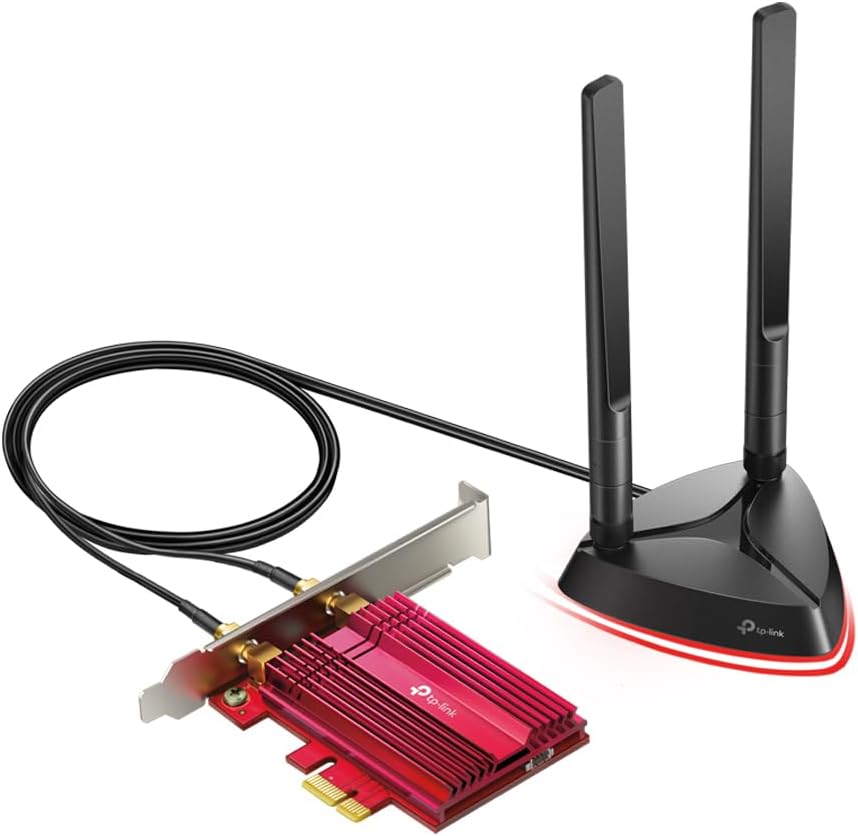
What we liked: We stuck the magnetic antenna base on top of the case and got consistently better reception than the fixed rear-port position we’d used before. Bluetooth 5.3 handled a wireless headset and game controller at once without lag, and we found it a clear upgrade from the 4.2 adapter it replaced. The low-profile bracket was a thoughtful inclusion that let us fit it in a compact mini-ITX build without any clearance problems.
About TP-Link: TP-Link is a U.S.-based global networking company with over 20 years of experience producing consumer and business wireless networking equipment, including routers, switches, and WiFi adapters.
Availability: The Archer TX3000E PCIe WiFi card is available on Amazon. It is priced at $28.84 with Prime shipping available.
Pros: Bluetooth 5.3 built in, PCIe stability advantage over USB, magnetic repositionable antennas.
Cons: Desktop PCIe slot required (not compatible with laptops), driver download from TP-Link website required.
Recommendation: The Archer TX3000E is the top choice for desktop users who want a permanent internal WiFi 6 and Bluetooth 5.3 upgrade with repositionable antennas and the stability of a PCIe connection.
| TP-Link Archer TX3000E PCIe WiFi Card Features | Description |
|---|---|
| WiFi Standard | WiFi 6 (802.11ax), Intel-powered |
| Hardware Interface | PCIe |
| Max Speed | 2400 Mbps (AX3000) |
| Bands | Dual Band: 5 GHz (up to 2402 Mbps), 2.4 GHz (up to 574 Mbps) |
| Bluetooth | Bluetooth 5.3 |
| Antennas | 2 x external antennas with magnetic repositionable base |
| Technology | OFDMA, MU-MIMO |
| Bracket Options | Standard and low-profile bracket included |
| Compatible OS | Windows 10 (64-bit), Windows 11 (64-bit) |
| Rating | 4.7/5 (10,661 reviews) |
| Average Price in USD | $28.84 |
| Where to Buy | amazon.com |
What Makes a WiFi Adapter Worth Installing on a Desktop PC?
Most desktop PCs ship without a wireless card, so adding WiFi means choosing between a USB dongle and a PCIe card. The difference is not just physical. USB adapters are portable and require no tools, but they are limited by USB bandwidth and antenna placement near the back of a tower. PCIe cards install permanently inside the case, deliver more consistent throughput, and support larger external antennas. For most buyers, the decision comes down to whether the PC has an open PCIe slot and whether they’ll open the case.
The wireless standard matters more than most buyers expect. WiFi 5 (802.11ac) delivers up to 867 Mbps on 5 GHz, which is adequate for most home use. WiFi 6 (802.11ax) reaches up to 1201 Mbps on 5 GHz with lower latency and better performance on crowded networks. WiFi 6E and WiFi 7 add access to the 6 GHz band, which is nearly free of interference from older devices. Upgrading to WiFi 6 or higher only helps if the home router also supports that standard.
Antenna design directly affects real-world range. A single internal antenna on a nano USB dongle performs well within 20 feet of the router but degrades quickly through walls. Dual antennas with beamforming, like on the Archer TX20U Plus and BrosTrend AXE3000, focus the signal and hold a stronger connection at longer distances. The difference is significant in a two-story home or any setup where the PC sits more than one room away from the router.
The mistake most buyers make is ignoring OS compatibility. Nearly every USB WiFi adapter works with Windows 10 and 11, but macOS and Linux support vary widely. Several adapters require manual driver installation on macOS, and Linux compatibility is often absent entirely. The BrosTrend AXE3000 is a specific exception with native Linux kernel support, while the NETGEAR A8500 requires Windows 11 and will not function on Windows 10 at all. Checking OS requirements before purchasing saves a return shipping label.
What Is the Difference Between a USB WiFi Adapter and a PCIe WiFi Card?
A USB WiFi adapter plugs into a USB port and requires no internal installation, making it easy to move between machines. A PCIe WiFi card installs inside the desktop case in a PCIe slot and offers a more stable, higher-throughput connection since it is not limited by USB bandwidth. PCIe cards also support larger external antennas that can be repositioned anywhere on or near the desk. For most casual users a USB adapter is sufficient, but for gaming or heavy streaming a PCIe card like the TP-Link Archer TX3000E gives a measurable performance and stability edge.
Do I need WiFi 6 or WiFi 7 for my PC?
WiFi 6 is the right choice for most users in 2025. It offers real improvements over WiFi 5 in network efficiency and handles congested networks better, which matters in homes with many connected devices. WiFi 7 makes sense only if the home router already supports it and the use case involves consistently high data loads like 4K video conferencing or large file transfers. All five adapters on this list include WiFi 6 as a baseline, with the NETGEAR A8500 as the only WiFi 7 option for those who need the highest possible ceiling.
Will a WiFi adapter work with my existing router?
Yes, WiFi adapters are backward compatible with older router standards. A WiFi 6 adapter works with a WiFi 5 or WiFi 4 router at whatever speed the router supports. The adapter simply cannot exceed the router’s wireless generation. To take full advantage of WiFi 6 features like OFDMA and MU-MIMO, the router needs to support WiFi 6 as well. Buying a WiFi 7 adapter like the NETGEAR A8500 only pays off with a WiFi 7 router on the other end.
Why is my USB WiFi adapter slower than expected?
The most common cause is using a USB 2.0 port instead of USB 3.0. USB 2.0 has a maximum bandwidth of 480 Mbps, which bottlenecks any WiFi 6 adapter on the 5 GHz band before it reaches rated speeds. USB 3.0 ports are typically marked blue or labeled “USB 3.0” on the port itself. Placement also matters. A dongle plugged into the back of a tower sitting under a desk will receive a significantly weaker signal than an adapter on the desk surface via an extension cable.
Which WiFi adapter works with Linux?
The BrosTrend AXE3000 is the strongest Linux option on this list. It uses a driver built into the Linux kernel from version 5.18 onward, working without manual installation on Ubuntu 22.04+, Debian 12+, Fedora 36+, Arch Linux, and other distributions running a current kernel. Most other USB WiFi adapters require manual driver downloads and compilation on Linux, and some have no Linux support at all. The BrosTrend adapter also supports Windows 10 and 11 with a downloadable driver for dual-boot setups.
How do I know if my PC has a USB 3.0 port?
USB 3.0 ports are usually identified by a blue-colored port housing or a small “SS” (SuperSpeed) logo stamped next to the port. On newer machines, some USB 3.0 and USB 3.1 ports look identical to USB 2.0 ports externally, so checking the motherboard manual or manufacturer’s spec page is the most reliable method. Device Manager on Windows lists port types under Universal Serial Bus Controllers. For WiFi 6 adapters on the 5 GHz band, USB 3.0 is necessary to avoid a bandwidth bottleneck that caps speeds at USB 2.0’s 480 Mbps ceiling.
Can a WiFi adapter replace a wired Ethernet connection for gaming?
A WiFi 6 adapter with dual antennas and a quality router can come close to wired Ethernet for most gaming scenarios, but it is not a direct replacement for competitive play. Wired connections offer lower and more consistent latency, which matters in fast-paced multiplayer games where milliseconds count. For casual gaming, streaming, or everyday use, a solid WiFi 6 adapter like the TP-Link TX3000E PCIe card or the Archer TX20U Plus performs well enough that the difference is rarely noticeable in practice.
The TP-Link Archer TX3000E PCIe WiFi Card stands out as the strongest overall pick on this list. With a 4.7-star rating across more than 10,000 reviews, an Intel-powered WiFi 6 chipset, built-in Bluetooth 5.3, and magnetic repositionable antennas, it delivers performance and versatility that no USB adapter on this list can match at the same price of $28.84.
For current pricing and availability on all five adapters, check the links on Amazon. Stock levels and promotions change frequently, and Prime members often find same-day or next-day shipping available on these products.