
E-ink tablets have moved well past basic e-reading. The best ones now combine a paper-like display with stylus support, cloud syncing, and enough processing power for real note-taking and document work. What separates a good e-ink tablet from a frustrating one comes down to three things: display quality, writing latency, and software flexibility. Display quality means resolution and glare control. Writing latency is how fast the stylus registers on screen. Software flexibility is whether the device runs a closed ecosystem or open Android. Price alone is a poor guide in this category, with capable options ranging from $259 to nearly $700.
The tablets in this list were selected based on display resolution, stylus pressure levels, storage, battery life, and user ratings across hundreds of verified reviews. Some prioritize a pure writing experience with no distractions; others lean into Android app support and productivity features. A few include color e-ink for readers who want more than monochrome. Understanding which use case fits your needs before buying will save a lot of frustration.
This roundup covers seven e-ink tablets that represent the best available across different size ranges, price points, and use cases in 2025. One of these will fit whether you want a distraction-free notebook, a dedicated e-reader with annotation, or an open Android device with a paper-like screen.
- BOOX Note Air 5 C
- Amazon Kindle Scribe
- iflytek AINOTE 2
- Penstar eNote Pro
- TCL NXTPAPER 11 Plus
- Musnap Ocean
- Huion EB1011
1. BOOX Note Air 5 C
BOOX Note Air 5 C is a 10.3-inch color e-ink tablet with a Kaleido 3 display, 6GB RAM, 64GB storage, and an octa-core processor. It stands out for pairing color e-ink with full Android app support, which most competitors in this size class do not offer. The device uses Kaleido 3 technology with a cover-glass design, giving it 300 ppi resolution in black and white and 150 ppi in color. It works best for readers and professionals who want a note-taking device that runs Kindle, Notion, or Google Docs without a closed ecosystem.

What we liked: We noticed right away how smooth the handwriting felt at 4,096 levels of pressure sensitivity. The Android 15 OS gave us access to apps we actually use daily, which made it practical beyond just reading and note-taking. The front light with warm and cold adjustment was a nice detail that made it easy to use for longer sessions without straining our eyes.
About BOOX: BOOX is a brand under Onyx International, a Chinese hardware company that has specialized in e-ink devices and e-readers since 2007.
Availability: BOOX Note Air 5 C is available on Amazon in a single configuration with 6GB RAM and 64GB storage. It is priced at $529.99 with free shipping for Prime members.
Pros: Full Android 15 support, color e-ink display, high-resolution stylus input.
Cons: Color resolution capped at 150 ppi, stylus not included in box.
Recommendation: BOOX Note Air 5 C is built for readers who want color e-ink with open Android app support and no closed-ecosystem restrictions.
| BOOX Note Air 5 C Features | Description |
|---|---|
| Display | 10.3″ Kaleido 3 color e-ink, glass cover-lens |
| Resolution | 300 ppi (B/W), 150 ppi (Color) |
| Processor | Octa-core |
| RAM / Storage | 6GB RAM / 64GB ROM |
| OS | Android 15 |
| Stylus | BOOX stylus touch, 4,096 pressure levels (not included) |
| Connectivity | Wi-Fi, Bluetooth 5.1 |
| Battery | 3,700mAh |
| Dimensions | 225 x 192 x 5.8 mm, 430g |
| Rating | 3.9/5 (168 reviews) |
| Average Price in USD | $529.99 |
| Where to Buy | amazon.com |
2. Amazon Kindle Scribe
Amazon Kindle Scribe is an 11-inch e-ink writing tablet with 32GB storage, a paper-textured display, and a Premium Pen included. It earns its place as the top writing-focused Kindle for anyone in the Amazon ecosystem, with access to the Kindle Store, Google Drive, and OneDrive. The device is 5.4mm thin and 400g, with a front light that automatically adjusts to ambient conditions. The textured surface mimics real paper under the stylus. It works best for readers who annotate books and students or professionals who want to mark up imported PDFs and Word documents.

What we liked: The writing response was genuinely fast, noticeably faster than previous Kindle Scribe models we’ve used. We liked that the pen requires zero charging and never runs out of battery mid-session. The AI-powered notebook tools were a surprise, letting us search our handwritten notes and generate summaries without any extra apps.
About Amazon: Amazon is a US-based technology and e-commerce company headquartered in Seattle, Washington, and has produced Kindle e-readers and tablets since 2007.
Availability: Amazon Kindle Scribe (newest model) is available directly on Amazon with the Premium Pen included. It is priced at $499.99 with free Prime shipping and occasional promotional discounts.
Pros: Premium Pen included, AI notebook tools, seamless Kindle Store access.
Cons: Closed ecosystem limits third-party apps, black and white display only.
Recommendation: Kindle Scribe is the right pick for Amazon users who want a writing tablet that handles annotation and note-taking without third-party apps.
| Amazon Kindle Scribe Features | Description |
|---|---|
| Display | 11″ paper-textured e-ink with front light |
| Storage | 32GB |
| Thickness / Weight | 5.4mm / 400g |
| Pen | Premium Pen included, no charging required |
| Cloud Integrations | Google Drive, Microsoft OneDrive, Microsoft OneNote |
| AI Tools | Note search, summaries, handwriting conversion |
| Battery Life | Weeks on a single charge |
| Rating | 4.4/5 (306 reviews) |
| Average Price in USD | $499.99 |
| Where to Buy | amazon.com |
3. iflytek AINOTE 2
iflytek AINOTE 2 is a 10.65-inch e-ink tablet with a frontlight-free display and AI-assisted note-taking, bundled with a Deep Navy folio case and stylus pen. Its primary differentiator is real-time voice-to-text transcription across 18 languages. It is one of the few e-ink tablets designed specifically for meeting capture and multilingual note work. The device uses a frontlight-free e-ink panel that requires ambient lighting but reduces eye strain in typical office and outdoor settings. It is designed for professionals, students, and multilingual users who need to record and organize spoken content rather than just read and write on-screen.

What we liked: We found the voice-to-text transcription surprisingly accurate in a normal meeting environment with moderate background noise. The AI assistance tools for summarizing and organizing selected text helped us process notes faster than we expected from an e-ink device. The bundle packaging felt complete out of the box, with the folio case, stylus, and cable all included without needing extra purchases.
About iflytek: iflytek is a Chinese AI company headquartered in Hefei, Anhui Province, specializing in speech recognition and natural language processing since 1999.
Availability: iflytek AINOTE 2 Bundle is available on Amazon including the Deep Navy folio case, stylus pen, USB cable, and user manual. It is priced at $698 with standard shipping options.
Pros: 18-language voice transcription, AI note assistance, complete bundle included.
Cons: Frontlight-free display requires external light, transcription requires active Wi-Fi connection.
Recommendation: iflytek AINOTE 2 is for multilingual professionals who need real-time meeting transcription in an e-ink format, without a separate recording app or service.
| iflytek AINOTE 2 Features | Description |
|---|---|
| Display | 10.65″ frontlight-free e-ink |
| Generation | 2nd Generation |
| Transcription | 18-language real-time voice-to-text |
| AI Features | Text summarization, interaction with selected notes |
| Battery | Up to 14 days (30 min/day use), 113 days standby |
| Thickness | 4.2mm |
| Warranty | 1 Year Manufacturer |
| Bundle Includes | Tablet, folio case, stylus pen, USB cable, user manual |
| Rating | 4.4/5 (21 reviews) |
| Average Price in USD | $698 |
| Where to Buy | amazon.com |
4. Penstar eNote Pro
Penstar eNote Pro is a 10.3-inch color e-ink tablet with 128GB storage, a Kaleido 3 display, a premium aluminum-alloy B6 stylus, and a folio cover. It differentiates itself with five physical shortcut buttons and a pen-only smart sidebar that blocks accidental finger input during focused writing sessions. The device uses MyScript handwriting recognition for real-time note conversion, supports 52-language voice-to-text, and syncs to Google Drive, OneDrive, and Dropbox. It works best for business professionals, academics, and students who need a high-capacity color e-ink device with fast workflow shortcuts and reliable cross-device syncing.

What we liked: The five customizable physical buttons made switching between writing and reading modes noticeably faster than tapping through menus. We liked the pen-only sidebar feature, which kept accidental finger presses from interrupting focus during long writing sessions. The 128GB storage meant we never had to manage files carefully, which made importing large PDF collections and document libraries easy.
About Penstar: Penstar is an e-ink tablet brand targeting business and academic users with color e-paper writing devices sold through Amazon.
Availability: Penstar eNote Pro is available on Amazon as a complete bundle with the B6 aluminum-alloy stylus, 10 spare nibs, and a magnetic folio cover. It is priced at $529 with standard Amazon shipping.
Pros: 128GB storage, five programmable shortcut buttons, complete bundle with stylus and case.
Cons: Newer brand with limited long-term track record, color resolution limited to 150 ppi like all Kaleido 3 devices.
Recommendation: Penstar eNote Pro is for productivity users who need large storage, physical shortcut buttons, and a complete writing setup without separate accessory purchases.
| Penstar eNote Pro Features | Description |
|---|---|
| Display | 10.3″ Kaleido 3 color e-ink |
| Storage | 128GB |
| Stylus | Aluminum-alloy B6, 10 spare nibs included |
| Physical Buttons | 5 fully customizable shortcut buttons |
| Voice-to-Text | 52-language real-time support |
| Cloud Sync | Google Drive, OneDrive, Dropbox |
| Handwriting Recognition | MyScript technology |
| Warranty | 2 Year Manufacturer |
| Rating | 4.1/5 (60 reviews) |
| Average Price in USD | $529 |
| Where to Buy | amazon.com |
5. TCL NXTPAPER 11 Plus
TCL NXTPAPER 11 Plus is an 11.5-inch Android 15 tablet with a 120Hz 2.2K display, 8GB RAM, 256GB storage, and a 4096-level T-PEN stylus. It stands apart with a paper-mode display that mimics e-ink in feel while delivering LCD-level refresh rates through three switchable VersaView modes. The device is built with an MTK Helio G100 processor, TUV-certified low blue light, and an 8000mAh battery with 33W fast charging. It is built for users who want a paper-feel experience for drawing and note-taking without accepting the performance limitations of true e-ink technology.
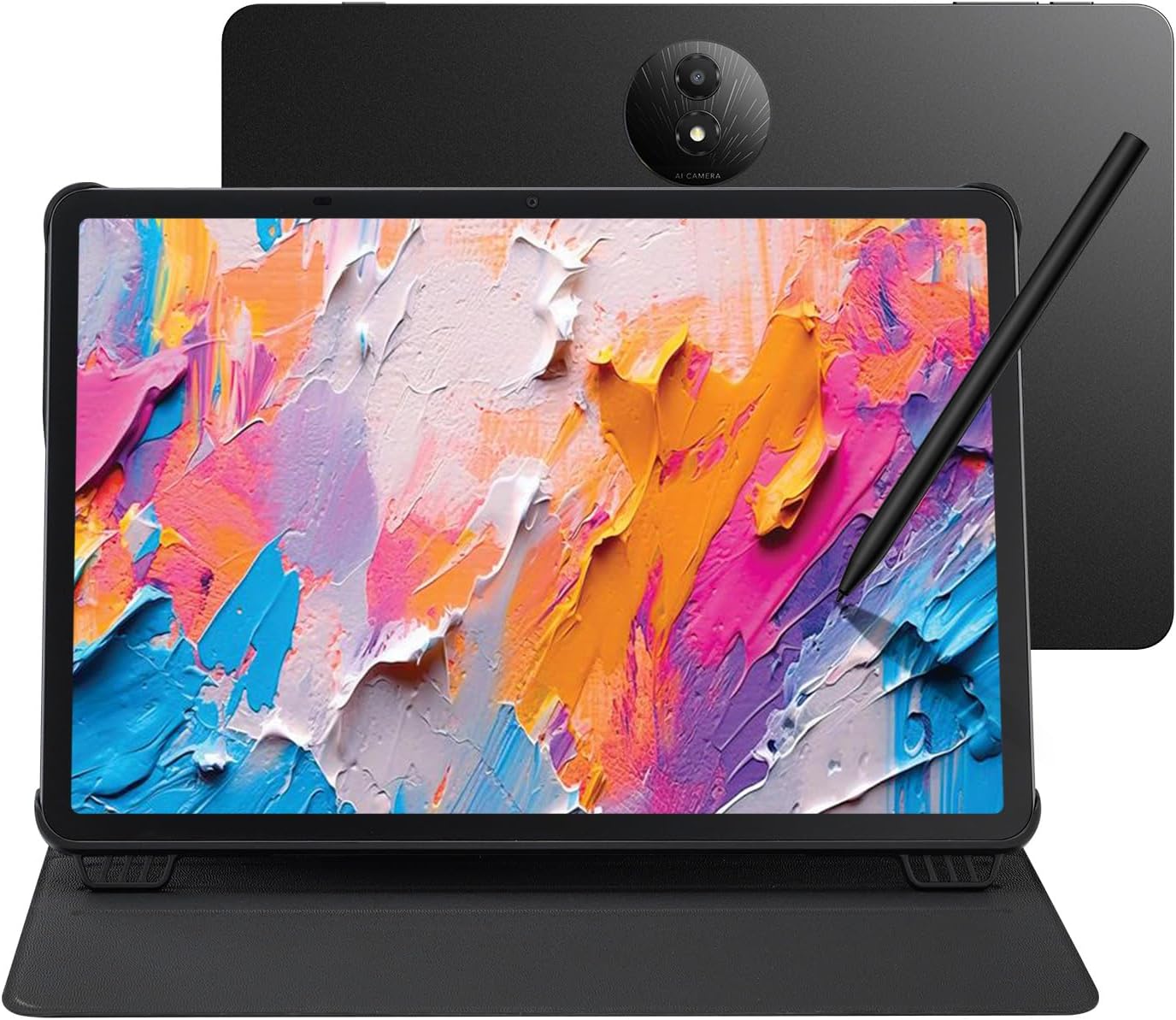
What we liked: Switching display modes with the NXTPAPER key took one second and genuinely changed how the screen felt for each task. We noticed the 120Hz refresh made scrolling and writing feel much more fluid than any true e-ink device in this roundup. The 8000mAh battery held up through a full workday of note-taking and document review without needing to reach for a charger.
About TCL: TCL is a Chinese multinational electronics company headquartered in Huizhou, Guangdong, specializing in TVs, mobile devices, and tablets since 1981.
Availability: TCL NXTPAPER 11 Plus is available on Amazon with the T-PEN stylus and flip case included. It is priced at $369.99 with free Prime shipping.
Pros: 256GB storage, 120Hz display with three mode switching, stylus and case included.
Cons: Not true e-ink technology, no microSD expansion slot.
Recommendation: TCL NXTPAPER 11 Plus is for users who want a paper-feel display with real performance for drawing and multitasking, without slow e-ink refresh rates.
| TCL NXTPAPER 11 Plus Features | Description |
|---|---|
| Display | 11.5″ NXTPAPER 4.0, 120Hz, 2.2K resolution |
| Processor | MTK Helio G100 |
| RAM / Storage | 8GB + 8GB expandable RAM / 256GB |
| OS | Android 15 |
| Stylus | T-PEN, 4096 pressure levels (included) |
| Battery | 8000mAh, 33W fast charging |
| Cameras | 8MP front and rear |
| Weight / Thickness | 1.08 lbs / 0.26 inches |
| Rating | 4.4/5 (207 reviews) |
| Average Price in USD | $369.99 |
| Where to Buy | amazon.com |
6. Musnap Ocean
Musnap Ocean is a 7-inch e-ink reading and writing tablet with 4GB RAM, 64GB storage, and an octa-core 2.2GHz processor running Android. Its appeal comes from a strong 4.5-star rating, a sub-$260 price, and a paper-like display suited for long reading sessions and note-taking. The device uses a glare-free e-ink touchscreen with adjustable brightness and color temperature, supporting handwriting through the Musnap Stylus Pen sold separately. It is designed for readers, students, and casual users who want an affordable Android-based e-ink tablet with enough power for third-party apps and document formats.

What we liked: We found the fast page turns and brightness adjustments smooth for a device in this price range. The 4GB RAM kept app switching from lagging, which is a common problem on cheaper e-ink tablets. The format support was broad enough that we could load our entire reading library without converting files.
About Musnap: Musnap is an e-ink device brand producing reading tablets and stylus accessories, focused on delivering affordable Android e-ink hardware with wide format support.
Availability: Musnap Ocean is available on Amazon in a 4GB RAM and 64GB storage configuration. It is priced at $259 with the stylus pen sold separately.
Pros: Competitive sub-$260 price, 4GB RAM, broad document and audio format support.
Cons: Stylus not included, smaller 7-inch display limits workspace for note-taking.
Recommendation: Musnap Ocean is for budget-conscious readers who want an Android e-ink tablet with broad format support, without needing a large screen or bundled stylus.
| Musnap Ocean Features | Description |
|---|---|
| Display | 7″ glare-free e-ink touchscreen |
| Processor | Octa-core, 2.2GHz |
| RAM / Storage | 4GB RAM / 64GB storage |
| OS | Android |
| Connectivity | Wi-Fi, Bluetooth, USB |
| Format Support | EPUB, PDF, TXT, MOBI, AZW3, MP3, FLAC, DOCX, XLSX, PPTX |
| Stylus | Musnap Stylus Pen compatible (sold separately) |
| Rating | 4.5/5 (114 reviews) |
| Average Price in USD | $259 |
| Where to Buy | amazon.com |
7. Huion EB1011
Huion EB1011 is a 10.3-inch monochrome e-ink tablet with 64GB storage, a battery-free EMR stylus with 8192 pressure levels, and a dual-color front light. Its defining advantage is the professional-grade 8192-level pen input used in Huion’s dedicated drawing tablets. This gives artists a more precise and responsive surface than any other e-ink device in this roundup. The device is fully laminated with anti-glare glass and includes a PU leather case with built-in stand and stylus slot. It is designed for students and artists who want one device that handles reading, note-taking, and drawing with professional-grade pen tools.

What we liked: The 8192-level pressure sensitivity made fine line control feel closer to a dedicated drawing tablet than any other e-ink device we’ve tested. We liked that the battery-free pen means the stylus is always ready and never dies mid-session. The split-screen mode for simultaneous reading and note-taking was genuinely useful for document review without switching apps.
About Huion: Huion is a Chinese digital drawing company headquartered in Shenzhen, founded in 2011, known for pen tablets and pen displays for creative professionals.
Availability: Huion EB1011 is available on Amazon with the leather case, stylus with three replacement nibs, and USB cable included. It is priced at $329 with free Prime shipping.
Pros: 8192-level battery-free stylus, 2TB storage expansion, doubles as PC drawing tablet.
Cons: Monochrome display only, runs Android 11 which is older than some competitors.
Recommendation: Huion EB1011 is for artists who need professional-grade stylus precision in an e-ink device, without buying a separate drawing tablet or e-reader.
| Huion EB1011 Features | Description |
|---|---|
| Display | 10.3″ fully laminated anti-glare e-ink, 227 PPI |
| Resolution | 1404 x 1872 |
| Stylus | Battery-free EMR, 8192 pressure levels, felt tip, tail eraser |
| Storage | 64GB internal, expandable to 2TB |
| OS | Android 11 |
| Battery | 4650mAh, up to 12 days |
| PC Mode | Functions as drawing tablet when connected to computer |
| Front Light | Dual-color adjustable (warm and cold) |
| Weight / Thickness | 0.99 lbs / 0.25 inches |
| Rating | 4.3/5 (648 reviews) |
| Average Price in USD | $329 |
| Where to Buy | amazon.com |
What Makes an E Ink Tablet Worth the Price?
E-ink tablets occupy an unusual space in the market: they cost more than basic e-readers but deliver a different experience than standard Android tablets. The buying decision usually comes down to whether you need a distraction-free writing and reading environment or a full-featured computing device. Most buyers underestimate how much the platform choice affects what the device can do. Open Android unlocks third-party apps; a closed ecosystem keeps you in one store.
Display resolution is the most important spec to check before buying. Monochrome e-ink panels typically deliver 227 to 300 ppi, which produces sharp, clear text. Color e-ink (Kaleido 3) drops to 150 ppi for color content, which is noticeably softer on images and illustrations but still clean for body text. If you plan to read primarily text, color e-ink is fine. If image quality matters, a monochrome panel at 300 ppi will consistently look better.
Stylus pressure levels determine how natural the writing and drawing experience feels. A tablet with 4,096 pressure levels handles handwriting well. A device with 8,192 levels, like the Huion EB1011, delivers the kind of line variation and control that artists expect from professional drawing hardware. A tablet with no pressure sensitivity or capacitive-only touch (some cheaper models) will not feel like writing on paper, regardless of the display technology.
The most common mistake buyers make is choosing the cheapest option without checking whether the stylus is included. Several tablets in this price range sell the pen separately, which adds $30 to $60 to the real cost. The second most common mistake is assuming all e-ink devices run third-party Android apps. Amazon’s Kindle Scribe is a closed system. That works fine for Kindle users but frustrates anyone who needs Notion, GoodNotes, or a custom PDF reader. Always verify platform openness before buying.
Can you use an e-ink tablet as your main tablet?
It depends on what you use a tablet for. E-ink tablets handle reading, note-taking, PDF annotation, and document work well. They are not suited for video, gaming, or fast-scrolling apps because e-ink refresh rates are inherently slower than LCD screens. Open Android models like the BOOX Note Air 5 C and Huion EB1011 run third-party apps. Even so, no e-ink tablet replaces a general-purpose tablet for video or app-heavy workflows.
What is the difference between color e-ink and regular e-ink?
Color e-ink (Kaleido 3) adds a color filter layer over a monochrome panel, dropping color resolution to around 150 ppi. Regular monochrome e-ink panels deliver sharper text at 227 to 300 ppi but show everything in black and white. Color e-ink works well for reading magazines, comics, and color PDFs but looks softer than an LCD screen on detailed images. Several devices in this roundup, including the BOOX Note Air 5 C and Penstar eNote Pro, use color e-ink.
Do e-ink tablets work well for drawing?
E-ink tablets with high-pressure stylus support work well for sketching, but slow refresh rates limit them compared to an iPad or dedicated drawing tablet. Huion EB1011 is the strongest option for drawing, with 8192-level pressure sensitivity and a PC drawing tablet mode for professional software. For occasional sketching and annotating documents, most stylus-equipped e-ink tablets in this list perform well enough.
How long does the battery last on an e-ink tablet?
True e-ink tablets last days or weeks per charge because the display only uses power when the screen refreshes, not while showing static content. The Kindle Scribe and Musnap Ocean both advertise weeks of use per charge for reading. Devices that run full Android with active apps, like the BOOX Note Air 5 C, will drain faster with intensive use. TCL NXTPAPER 11 Plus is not true e-ink and runs about one full day under typical workloads.
Is a stylus necessary for an e-ink tablet?
A stylus is only necessary if you plan to take handwritten notes, annotate documents, or draw. Five tablets in this roundup include a stylus: Kindle Scribe, iflytek AINOTE 2, Penstar eNote Pro, TCL NXTPAPER 11 Plus, and Huion EB1011. The Musnap Ocean and BOOX Note Air 5 C require a separate stylus purchase. If you primarily want to read, highlight text, and type notes, a stylus is optional.
What file formats do e-ink tablets support?
Most open-Android e-ink tablets support a wide range of formats including EPUB, PDF, MOBI, AZW3, DOCX, TXT, and common image formats. The Kindle Scribe is more restrictive, working best with Amazon’s own formats and imported documents via Drive or OneDrive. Large multi-format libraries need less conversion on open Android devices like BOOX Note Air 5 C or Huion EB1011 than on Kindle.
Are e-ink tablets good for students?
E-ink tablets are well suited for students who read long documents, annotate textbooks, and take handwritten notes. The paper-like display reduces eye strain during extended reading sessions compared to a backlit LCD screen. Devices like the Penstar eNote Pro (128GB) and Huion EB1011 (up to 2TB) handle large course libraries without storage management headaches. The Kindle Scribe suits students already in the Amazon ecosystem, while BOOX and Huion devices suit students who need more flexibility with third-party apps.
Conclusion
The Huion EB1011 stands above the rest in this roundup for users who want the best combination of writing precision and reading capability. Its 8192-level battery-free stylus delivers pen control no other device in this list matches. The ability to connect it as a PC drawing tablet makes it a genuinely dual-purpose tool. At $329 with a leather case included, it delivers more usable hardware than several more expensive options here.
Each of the seven tablets in this list is available on Amazon with current pricing and shipping details. Check the links above to compare current prices before buying, as pricing in this category changes frequently with promotions and new model releases.