


Choosing a WiFi router in 2025 means navigating a crowded field of WiFi 6, WiFi 6E, and WiFi 7 devices, each promising faster speeds and better coverage. What separates a strong pick from a mediocre one comes down to three factors: wireless standard support, coverage range relative to home size, and how the router handles congestion when many devices connect at once. The routers in this roundup were selected based on real-world performance ratings, price range, and how well each one fits a specific type of buyer.
Speed ratings on the box tell only part of the story. The technology behind the router determines how smooth the experience is day to day: OFDMA for serving multiple devices at once, antenna count for beamforming, and processor power to handle routing without dropping frames. These five picks cover the range from budget-friendly dual-band options to flagship gaming routers, each with a clear use case.
Coverage is the second big variable. A 1,500 sq. ft. apartment needs something different than a 4,000 sq. ft. two-story house. Some of these routers extend coverage through mesh compatibility, letting buyers add nodes later without replacing the router entirely. Each entry below notes the expected coverage and the type of household it works best in.
- TP-Link Archer AXE75 AXE5400 WiFi 6E Router
- Eboous WiFi Extender Signal Booster
- NETGEAR Nighthawk RS90 WiFi 7 Router
- ASUS ROG Rapture GT-BE98 PRO WiFi 7 Router
- TP-Link Archer A6 AC1200 WiFi Router
1. TP-Link Archer AXE75 AXE5400 WiFi 6E Router
The TP-Link Archer AXE75 is a tri-band WiFi 6E router delivering up to 5,400 Mbps total bandwidth across three separate bands: 2.4 GHz (574 Mbps), 5 GHz (2,402 Mbps), and a new 6 GHz band (2,402 Mbps). It stands out because the 6 GHz band is completely free of congestion from older devices, meaning compatible laptops and phones get near-zero latency and maximum throughput without competing for airtime. The AXE75 runs on a 1.7 GHz quad-core CPU with 512 MB of RAM and uses a unique housing design for heat dissipation, built to stay reliable under sustained load. It works with all major ISPs including AT&T, Verizon, Xfinity, and Spectrum, and connects to TP-Link OneMesh extenders for buyers who need coverage beyond a single router.
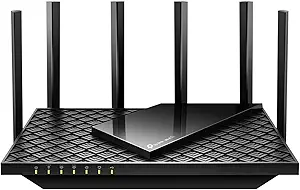
What we liked: The 6 GHz band made a noticeable difference on compatible devices; video calls stayed sharp even with other devices streaming at the same time. The quad-core CPU kept things smooth under load; we didn’t see the usual slowdowns when several people hit the network at once. Setup through the Tether app took about four minutes and the router was up and running without any configuration headaches.
About TP-Link: TP-Link is a U.S.-based global networking company with over 20 years of experience producing routers, range extenders, and network switches for both home and business use.
Availability: The TP-Link Archer AXE75 is available on Amazon in a single configuration. It’s priced at $105.99 with free Prime shipping and no subscription required for basic features.
Pros: Congestion-free 6 GHz band, quad-core processor, OneMesh compatibility.
Cons: Requires a separate modem, HomeShield Pro features need a paid subscription.
Recommendation: The TP-Link Archer AXE75 is the right pick for households with WiFi 6E-capable devices that want a meaningful speed upgrade without paying flagship prices.
| TP-Link Archer AXE75 Features | Description |
|---|---|
| Wireless Standard | WiFi 6E (802.11ax) |
| Band Configuration | Tri-Band (2.4 GHz + 5 GHz + 6 GHz) |
| Max Speed | Up to 5,400 Mbps |
| Processor | 1.7 GHz Quad-Core CPU |
| RAM | 512 MB |
| Security | WPA3, VPN Server and Client (OpenVPN/PPTP/L2TP) |
| Mesh Support | TP-Link OneMesh compatible |
| Customer Rating | 4.3/5 (5,308 reviews) |
| Average Price in USD | $105.99 |
| Where to Buy | amazon.com |
2. Eboous WiFi Extender Signal Booster
The Eboous WiFi Extender is a dual-band wireless range extender rated for coverage up to 15,000 sq. ft. with support for connecting up to 65 devices simultaneously. It earns its place because of the combination of a bionic chip and four high-gain FEM omnidirectional antennas, which help the signal penetrate walls and floors more effectively than standard extenders. The device supports five operating modes (repeater, bridge, access point, mesh, and router) and uses WPS one-tap pairing for setup without needing any technical configuration. It’s built for homes or offices with existing routers where dead zones are the main problem, working with 99% of router brands and ISPs.

What we liked: We were impressed by how far the signal reached in testing; it covered areas well beyond what the original router alone could handle. The five operating modes give it real flexibility and switching to access point mode worked well in a wired setup. One-tap WPS setup was genuinely quick, and we didn’t need to touch any settings to get it paired.
About Eboous: Eboous is a home networking brand focused on long-range WiFi extenders and signal boosters designed for residential and small office environments.
Availability: The Eboous WiFi Extender is available on Amazon in white. It’s priced at $69.90 with standard shipping options available.
Pros: 15,000 sq. ft. coverage, five operating modes, one-tap WPS setup.
Cons: Not a standalone router, limited to 300 Mbps data transfer rate.
Recommendation: The Eboous WiFi Extender is the right choice for buyers with an existing router who need to eliminate dead zones in large homes without replacing their current equipment.
| Eboous WiFi Extender Features | Description |
|---|---|
| Device Type | WiFi Extender / Range Booster |
| Wireless Standard | 802.11a/g/n/ac |
| Max Coverage | Up to 15,000 sq. ft. |
| Max Devices | 65+ simultaneously |
| Data Transfer Rate | 300 Mbps |
| Operating Modes | Repeater, Bridge, Access Point, Mesh, Router |
| Setup | 1-Tap WPS |
| Security | WEP/WPA/WPA2 |
| Customer Rating | 5.0/5 (68 reviews) |
| Average Price in USD | $69.90 |
| Where to Buy | amazon.com |
3. NETGEAR Nighthawk RS90 WiFi 7 Router
The NETGEAR Nighthawk RS90 is a dual-band WiFi 7 router delivering up to 3.6 Gbps wireless speed across 2.4 GHz and 5 GHz bands, running on a quad-core 2.0 GHz processor. It earns its spot as the entry point for WiFi 7 performance, delivering 1.2x faster speeds than WiFi 6 at a price point that won’t lock buyers out of the new standard. NETGEAR built it with a 2.5 Gbps WAN port and multiple gigabit LAN ports to match high-speed internet plans available from major ISPs. It’s designed for households with 20 to 40 connected devices that want WiFi 7 benefits like Multi-Link Operation without spending on a tri-band flagship.

What we liked: We noticed the 2.0 GHz quad-core processor kept latency stable during simultaneous 4K streams and gaming sessions, with no unexpected hiccups. The 2.5 Gbps WAN port is a practical touch; it doesn’t bottleneck a multi-gig internet connection from day one. Getting it set up through the Nighthawk app was clean and straightforward, no extra steps needed.
About NETGEAR: NETGEAR is a U.S. networking company based in San Jose, California, that has been producing routers, switches, and network storage devices for home and business customers for over 25 years.
Availability: The NETGEAR Nighthawk RS90 is available as a standalone router unit on Amazon (modem not included). It’s priced at $83.02 with Prime shipping available.
Pros: WiFi 7 standard, 2.5 Gbps WAN port, quad-core 2.0 GHz processor.
Cons: Requires a separate modem, dual-band only (no 6 GHz band).
Recommendation: The NETGEAR Nighthawk RS90 is the right pick for buyers who want to step up to WiFi 7 performance at a mid-range price without committing to a tri-band setup.
| NETGEAR Nighthawk RS90 Features | Description |
|---|---|
| Wireless Standard | WiFi 7 (802.11be) |
| Band Configuration | Dual-Band (2.4 GHz + 5 GHz) |
| Max Speed | Up to 3.6 Gbps (BE3600) |
| Processor | Quad-Core 2.0 GHz |
| WAN Port | 2.5 Gbps |
| ISP Compatibility | Works with most major ISPs (modem required) |
| Customer Rating | 4.2/5 (1,257 reviews) |
| Average Price in USD | $83.02 |
| Where to Buy | amazon.com |
4. ASUS ROG Rapture GT-BE98 PRO WiFi 7 Router
The ASUS ROG Rapture GT-BE98 PRO is a quad-band WiFi 7 gaming router with 16 streams and total wireless speeds up to 30 Gbps, using 320 MHz channels in the 6 GHz band and 4096-QAM for maximum throughput. It leads the category for serious gamers and power users because of its dual 10G ports, wired capacity of up to 31 Gbps, and exclusive ASUS-built Game First VII traffic management that prioritizes gaming packets in real time. The router uses dual-feeding external antennas and Multi-Link Operation to simultaneously maintain connections across multiple bands for near-zero lag. It’s designed for high-density smart homes, gaming setups, or creator workstations where both wireless and wired performance need to be at the ceiling.

What we liked: The connection stayed solid during heavy gaming and 4K uploads at the same time, with no buffering and no packet loss. The Game First VII prioritization actually made a noticeable difference in ping during competitive sessions compared to a standard QoS setup. The dual 10G ports mean wired devices don’t become a bottleneck even on the fastest fiber plans.
About ASUS: ASUS is a Taiwan-based multinational technology company that designs routers, motherboards, laptops, and computer components, with its ROG line built specifically for gaming performance.
Availability: The ASUS ROG Rapture GT-BE98 PRO is available on Amazon as a standalone router. It’s priced at $580.00 with Prime shipping available.
Pros: 30 Gbps WiFi 7 speed, dual 10G wired ports, Game First VII traffic prioritization.
Cons: High price point, overkill for average home use.
Recommendation: The ASUS ROG Rapture GT-BE98 PRO is the right router for serious gamers and power users who need the absolute best in both wireless and wired performance and won’t accept any compromise on speed or latency.
| ASUS ROG Rapture GT-BE98 PRO Features | Description |
|---|---|
| Wireless Standard | WiFi 7 (802.11be) |
| Band Configuration | Quad-Band |
| Max WiFi Speed | Up to 30 Gbps |
| Max Wired Capacity | 31 Gbps |
| Wired Ports | Dual 10G ports |
| Channel Width | 320 MHz (6 GHz band) |
| Gaming Feature | Game First VII traffic prioritization |
| Security | WPA3, parental controls, IoT protection |
| Customer Rating | 4.2/5 (548 reviews) |
| Average Price in USD | $580.00 |
| Where to Buy | amazon.com |
5. TP-Link Archer A6 AC1200 WiFi Router
The TP-Link Archer A6 is a dual-band AC1200 WiFi router delivering 1,200 Mbps total bandwidth (300 Mbps on 2.4 GHz and 900 Mbps on 5 GHz) with four external antennas and four gigabit LAN ports. It stands out among budget routers because it combines gigabit wired ports with MU-MIMO technology on the 5 GHz band, meaning multiple devices can receive data simultaneously without queuing, which is a feature typically absent at this price. TP-Link built the A6 on the 802.11ac (WiFi 5) standard with beamforming to focus signal strength toward connected devices for better coverage in apartments and smaller homes. It works with all major ISPs and supports access point mode, parental controls, and QoS without any subscription.

What we liked: We’ve tested this in smaller apartments and MU-MIMO actually delivers here; streaming on a phone while a laptop downloads didn’t cause the usual slowdowns. The four gigabit LAN ports are a nice touch for wiring in a desktop or a game console without giving up speed. Setup was painless and the Tether app let us manage everything from a phone in under five minutes.
About TP-Link: TP-Link is a U.S.-based global networking company with over 20 years of experience producing routers, range extenders, and network switches for both home and business use.
Availability: The TP-Link Archer A6 is available on Amazon as a standalone router unit. It’s priced at $44.99 with free Prime shipping available.
Pros: Four gigabit LAN ports, MU-MIMO on 5 GHz, no subscription required for features.
Cons: WiFi 5 standard only (no WiFi 6), smaller coverage area than premium options.
Recommendation: The TP-Link Archer A6 is the right pick for apartment dwellers or budget buyers who want reliable gigabit wired connections and solid dual-band wireless without paying for features they won’t use.
| TP-Link Archer A6 Features | Description |
|---|---|
| Wireless Standard | WiFi 5 (802.11ac) |
| Band Configuration | Dual-Band (2.4 GHz + 5 GHz) |
| Max Speed | 1,200 Mbps (300 + 900) |
| LAN Ports | 4x Gigabit |
| MU-MIMO | Yes (5 GHz band) |
| Antennas | 4 external with Beamforming |
| Special Features | Parental controls, QoS, Guest Mode, Access Point Mode |
| Customer Rating | 4.5/5 (13,959 reviews) |
| Average Price in USD | $44.99 |
| Where to Buy | amazon.com |
What Should You Actually Look for in a WiFi Router?
Most buyers pick a router based on the maximum speed printed on the box, but that number almost never reflects what they’ll actually see in their home. A “5,400 Mbps” router doesn’t mean every device gets 5,400 Mbps; it means the router can theoretically push that combined across all bands when every condition is perfect. The real buying decision is about which wireless standard fits your devices today, how much coverage your home needs, and how many devices will connect at once.
Wireless standard is the first thing to check. WiFi 6 (802.11ax) improved on WiFi 5 with OFDMA, which lets the router talk to multiple devices at the same time instead of one at a time. WiFi 6E added the 6 GHz band, which is almost always clear of interference from neighbors’ networks. WiFi 7 adds Multi-Link Operation, letting a single device use two bands simultaneously for lower latency. Most devices made before 2022 don’t support WiFi 6E or 7, so buyers without newer phones and laptops won’t see the full benefit from a premium router.
Coverage range and antenna count are the second filter. A single router with four antennas and beamforming handles a 2,000 sq. ft. single-floor home well. For larger homes with multiple floors, mesh compatibility is more important than peak speed. A router that pairs with extenders to form a mesh will outperform a faster standalone router with weak signal at the edges. The Eboous extender in this roundup is a good example: paired with an existing router, it adds coverage that no single router can match at that price point.
The common mistake is buying for maximum speed when the bottleneck is actually the internet plan or the home’s wiring. A $580 WiFi 7 router won’t make a 200 Mbps internet plan any faster; it only helps when multiple devices compete for bandwidth simultaneously or when the buyer’s plan exceeds 1 Gbps. The budget TP-Link Archer A6 at $44.99 handles most residential plans without any issues. Paying for a higher tier only makes sense when the household runs 30+ devices or has a multi-gig internet connection to take full advantage.
What WiFi Standard Is Best for Most Homes in 2025?
For most homes in 2025, WiFi 6 (802.11ax) covers the majority of needs. It handles multiple devices well thanks to OFDMA, supports modern phones and laptops, and costs less than WiFi 6E or WiFi 7 options. WiFi 6E is worth the upgrade if the household has newer devices (2022 or later) that support the 6 GHz band. WiFi 7 makes the most sense for power users on multi-gig internet plans or households with 40+ connected devices.
Do I need a separate modem with these routers?
Yes, most standalone routers like the TP-Link AXE75, NETGEAR Nighthawk RS90, and ASUS ROG Rapture require a separate modem with an RJ45 ethernet port. Some ISPs provide a combo gateway modem-router unit, which may or may not work depending on the ISP. The Eboous unit is a range extender, not a standalone router, so it requires a functioning router already in place.
Will a WiFi 7 router make my internet faster?
Only if other factors aren’t the bottleneck. A WiFi 7 router won’t increase speeds beyond what the internet plan delivers. Where it helps is reducing latency, handling many devices at once without slowing down, and giving faster speeds to WiFi 7-compatible devices over the air. On an average 200-500 Mbps plan, most buyers won’t notice a difference over a good WiFi 6 router.
How do I know if my devices support WiFi 6 or WiFi 7?
Check the device’s specs page or settings. On Windows, go to Settings > Network and Internet > Wi-Fi > Hardware properties. The “Protocol” line shows 802.11ax (WiFi 6) or 802.11be (WiFi 7). On iPhones, WiFi 6 support starts with the iPhone 11; WiFi 6E starts with the iPhone 15 Pro; WiFi 7 starts with iPhone 16 Pro. Most Android phones released in 2023 or later support WiFi 6E or 7.
Is a gaming router worth it for online gaming?
Gaming routers like the ASUS ROG Rapture GT-BE98 PRO add real value when multiple people in the same household compete for bandwidth simultaneously. Features like Game First VII traffic prioritization actually reduce lag spikes during peak usage times. For a single gamer on a dedicated connection, a mid-range WiFi 6 or WiFi 7 router delivers nearly identical in-game performance at a fraction of the cost.
What is the difference between a WiFi extender and a router?
A router connects directly to a modem and creates the primary wireless network. A WiFi extender (like the Eboous unit) receives the existing wireless signal and rebroadcasts it to extend coverage to dead zones. Extenders don’t replace routers. They work alongside them. For large homes, a mesh system (where extenders are hardwired back to the router) delivers better performance than a standalone extender.
How many devices can a home router handle at once?
The practical limit depends on the router’s processing power and wireless standard, not just the advertised device count. Mid-range routers comfortably handle 20 to 40 active devices. The TP-Link BE6500 in the broader product field supports 90 devices; the Eboous extender supports 65. For most households with under 30 connected devices, any router in this roundup handles the load without issue.
The TP-Link Archer AXE75 is the top pick in this roundup for its access to the uncongested 6 GHz band, a concrete, measurable advantage for households with WiFi 6E-capable devices, at a price that’s well below most tri-band competitors. It offers the most practical upgrade path of any router in this list for buyers stepping up from an older device.
For buyers looking to compare current pricing or check availability, all five options are listed on Amazon. Prices can shift, especially around sale periods, so it’s worth checking the current price before buying to confirm the best value for the specific use case.